
 |
|
    |
|
    |
|


|
|
|
|||||||||
|
|||||||||||
OTHER ITV REGIONS FROM THE ASTRA DIGITAL SATELLITE
| Receiving your local
ITV1 region is as easy as pressing 103
The regions are allocated to the Electronic Programme Guide (EPG) according to postcode. |
 |
||||||||||||||||||||||||||||||||||||||||||||||||||||
| If you live in an overlap area you should find your alternative ITV1 on channel 963 |  |
||||||||||||||||||||||||||||||||||||||||||||||||||||
| Some people live in a triple-overlap area and will receive a second alternative ITV1 on 964 |  |
||||||||||||||||||||||||||||||||||||||||||||||||||||
| It is possible to add
the other regions to your EPG but you need to know certain details.
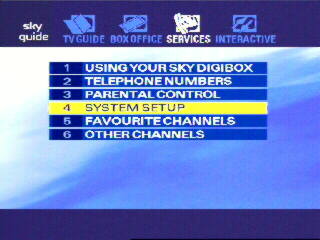
Here's how to do it... First, press Services on your Sky remote, and select Option 4 - System Setup ... |
 |
||||||||||||||||||||||||||||||||||||||||||||||||||||
| Then select Option 4 - Add Channels ... | 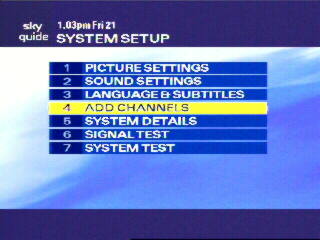 |
||||||||||||||||||||||||||||||||||||||||||||||||||||
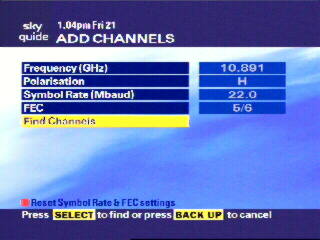
The ITV stations are
broadcast on three different transponders and you need to enter a
different set of parameters into the Add Channels page for each
transponder in turn. These are the settings for each transponder, along
with a list of the regions each one provides.
|
 |
||||||||||||||||||||||||||||||||||||||||||||||||||||
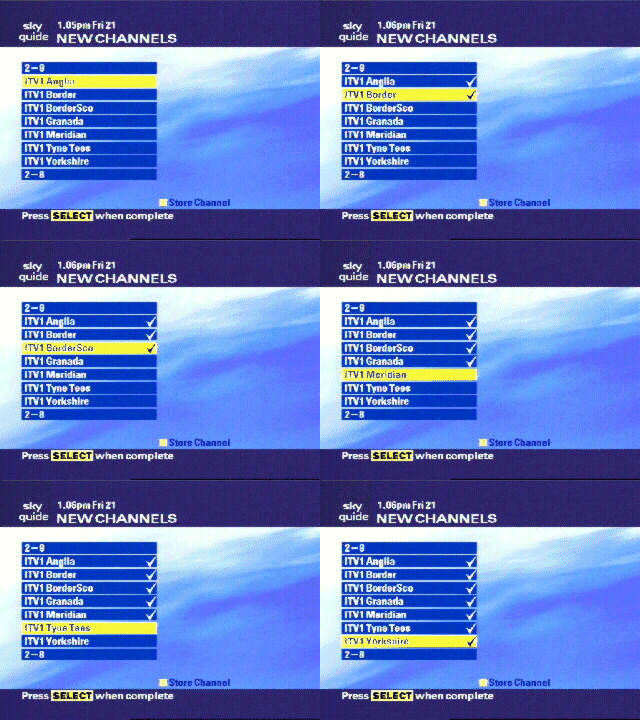
| After entering the
information for one of the three transponders and selecting Find
Channels you will see a list similar to this.
Highlight each region you wish to add using the up/down arrow buttons, select them by pressing the yellow key and then add your selection by pressing the Select key. Then repeat this process for the other two transponders. |
 |
||||||||||||||||||||||||||||||||||||||||||||||||||||
| When you have done this you can select any of these channels to watch by pressing Services and selecting Option 6 - Other Channels | 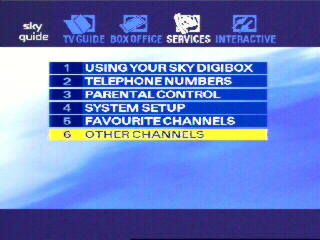 |
||||||||||||||||||||||||||||||||||||||||||||||||||||
| You should then have a list similar to this from which to select the channel you wish to watch. |  |
||||||||||||||||||||||||||||||||||||||||||||||||||||
|
|||
|

